2025
This Is the BEST Feature on Android
There’s so much content on the Internet that sometimes you don’t even know what to read or watch. That’s why I like this feature on my Samsung device — and it should be supported on all Android devices, though I haven’t tested it. It’s the Google Play Store widget. This widget can recommend movies […]
What On Earth Is This
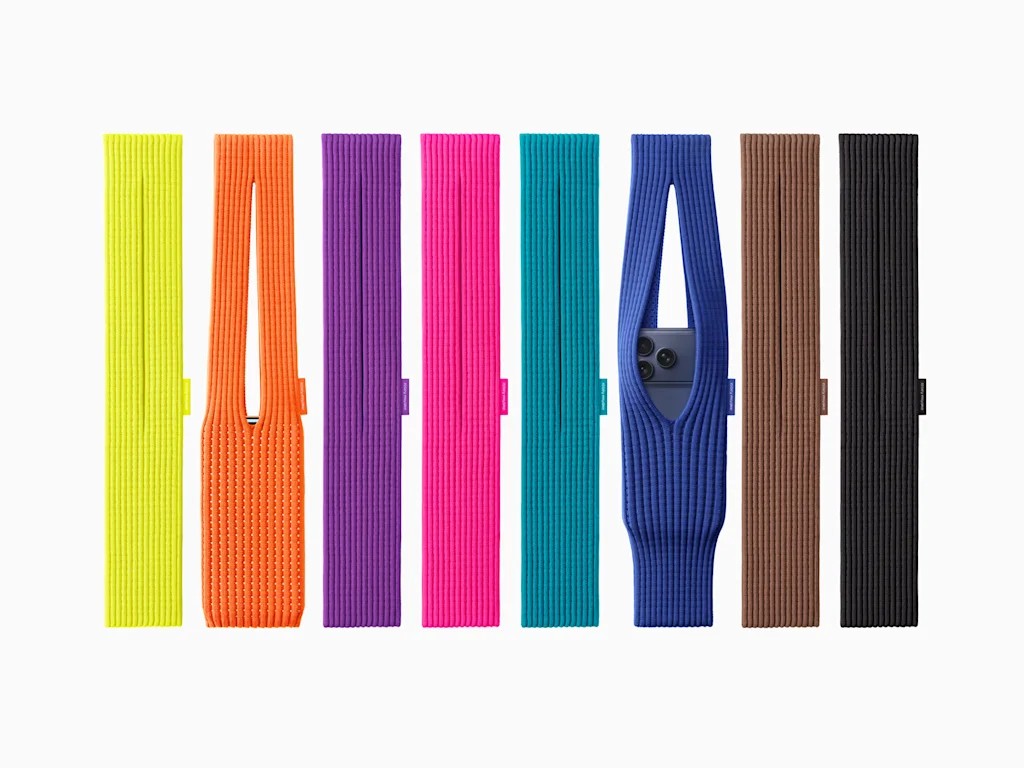
Apple could make a 200 dollar sock and people would buy it. Whatever the heck is this? Literally, what in tarnation is this? This is a 150-dollar carrying sock for your premium iPhone (iPhone 16e), not supported, of course. And it looks ridiculous. 150-230 depending on the design you get from a bright-colored sock? Honestly, […]
How To Import Fonts On Motion Ninja
Motion Ninja is one of the most fully-featured video editors available on mobile devices. Today, I will show you how to import a custom font into the application. First, make sure your desired font is downloaded and extracted (unzipped) onto your device. Next, open Motion Ninja, start a project, and tap Text. Tap Add Font. […]
How To Fix Notification Shade On Samsung
One UI 7 launched with a split notification shade. Here is how you can revert back to the old system. Swipe down twice to get access to the quick panel settings (or swipe on the left side of the camera). Then click the pen icon on the right side of the screen and click panel […]
How I Created a Custom Wiki About Myself
NotebookLM is finally working for me again! With over 100 videos transcribed by YouTube across multiple channels, I decided it was time to create a personal wiki about myself and my views. NotebookLM is great for this, but manually importing each video would be tedious and time-consuming. So, I used the YouTube to NotebookLM […]
How To Harness The Power of 67 To Make Anonymous Calls!!!
The 67 meme is sweeping the internet, and while nobody knows what it means, it can be used for espionage. Perhaps you need to call someone semi-anonymously, or want to prank your friends, or gather intel. Before I show you, be sure to follow all applicable laws and regulations, and note that this can […]
Samsung: Cancel the Edge, Improve the Flip
Samsung released the Galaxy Z Flip 7 series this year with some key improvements — a thinner, lighter design, a bigger cover screen (long gone are the days of Samsung trying to sell a 1.1-inch display as a “minimalism” feature), and finally, DeX support, turning the Flip into a true pocket-sized computer A few […]
How To Use Samsung Notes Math Solver
Samsung Notes has this really cool and useful feature that we’ve wanted for a long time — you can finally solve math equations right on your phone! First, check the Galaxy Store and make sure Samsung Notes is updated on your device. Then create a new note and tap the […]
Tab S10 Live vs Tab S10 FE
Samsung offers two budget-friendly S-series tablets: the Galaxy Tab S10 Lite and the Galaxy Tab S10 FE, along with a Plus model. Let’s determine which tablet is best for you. The Galaxy Tab S10 FE (128 GB Wi-Fi model) retails for $429.99 USD and features a 10.9-inch display with a 2304 x 1440 (WUXGA+) […]
How To Bypass SIM Setup on ANY Samsung Phone
For some reason, Samsung Galaxy Z Fold series devices and certain other Samsung models are shipped with a setup process that requires a SIM card. However, if you want to use the phone on Wi-Fi only, don’t have a physical SIM card, or rely on an eSIM from another device, there’s a way to […]